• Home
  • Download
  • Links
  • Photoplog
  • Blowfish Secret
  • Base64
  • Wordpress Salt
  • Contact
  • ROM
  • Skins
  • VIP
  • Tutorial
Wckediden - Mobile Tricks and Tweaks Community  

Go Back   Wckediden - Mobile Tricks and Tweaks Community > Wckediden Bulletin Announcements > Discussion Area > Just About Digital Community
Reload this Page You can prevent One UI from halting background apps and games, but be caref
Wckediden
Register Forum Rules FAQ Community Today's Posts Search

Notices
Under Construction

WckedIDen Forum Renovations

WckedIDen is currently undergoing forum structure renovations. During this process, you may experience intermittent errors, unavailable pages, or temporary service interruptions.

Please be patient while we work to improve the forum. We appreciate your understanding and continued support.


Community Links
Social Groups
Pictures & Albums
Members List
Meet Our Staff
Search Forums
 
Tag Search
Advanced Search
Search Downloads
Advanced Search
Search Links
Advanced Search
Find All Thanked Posts


Post New ThreadReply
 
Thread Tools
  #1  
Old 09-14-2026, 11:11 AM
phillynews215's Avatar
phillynews215 phillynews215 is offline   Thread Starter  
I'm A Community Feed Poster

  puertorico
 
Join Date: October 11th, 2009
Posts: 13,738
Downloads: 0
Uploads: 0
phillynews215 Knows Their Stuffphillynews215 Knows Their Stuffphillynews215 Knows Their Stuffphillynews215 Knows Their Stuffphillynews215 Knows Their Stuffphillynews215 Knows Their Stuffphillynews215 Knows Their Stuffphillynews215 Knows Their Stuffphillynews215 Knows Their Stuffphillynews215 Knows Their Stuffphillynews215 Knows Their Stuff


View phillynews215's Profile   Edit Options Edit Profile Picture View phillynews215's Photo Album Add phillynews215's to Your Contacts Show Groups Edit Avatar Subscribed Threads Private Messages
Rss Feed You can prevent One UI from halting background apps and games, but be caref

Smartphones aren't the best multitasking devices. Strides have been made in this area, and the Galaxy Z Fold lineup takes great advantage of features like multi-window. Still, the greatest obstacle standing in the way of true mobile multitasking is usually background processing and battery management.


Here's what we mean: Minimize a power-hungry app, such as a mobile game, for a moment, and it will cease working in the background. If it's an online game, it will likely disconnect you from the servers.


This means your game will restart or log you out any time you minimize it and temporarily switch to a different app, for example, a web browser.


Thankfully, there is a way to prevent this behavior by changing the way the app handles battery management.


And, no, pinning an app to Recents won't prevent it from halting when minimized. Pinning an app will only prevent it from disappearing from the Recents list when you press Clear all. It won't affect background processing.


Here's what you actually can do keep your apps running in the background and improve multitasking.


Prevent apps from closing in the background on your Galaxy device


Modern One UI offers three battery management profiles for each app:
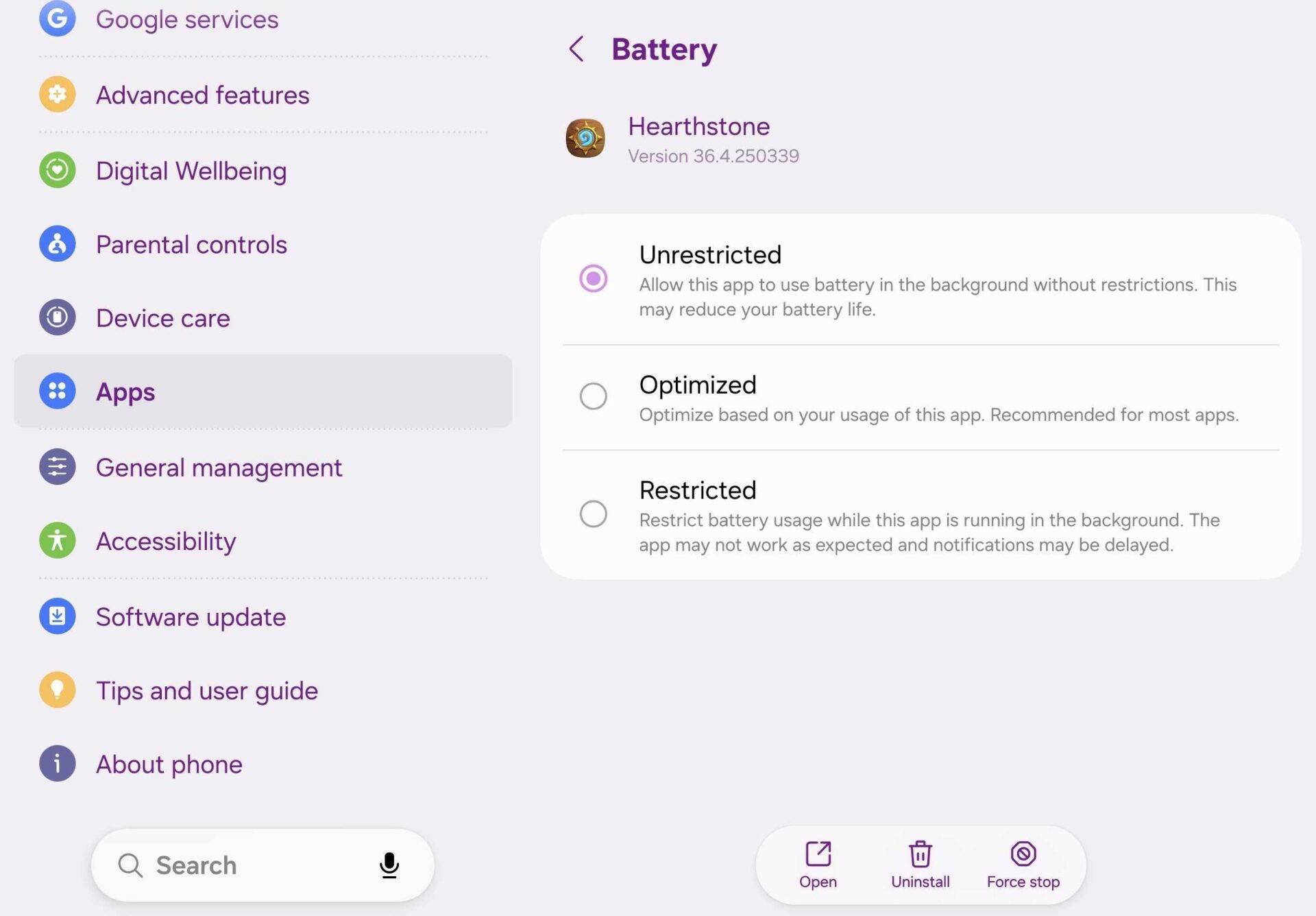


  • Unrestricted: Allows the app to use battery in the background without restrictions.
  • Optimized: Optimize based on your usage of the app.
  • Restricted: Restrict battery usage while this app is running in the background.


One UI app battery management | Source: Mihai Matei / SamMobile


Optimized is usually the default setting most apps have. However, for more demanding apps and games, this option is not good enough if you want to minimize the app without halting its process.


The setting you want is Unrestricted. When you select it, the app will continue running in the background uninterrupted, even when minimized. Similar to a desktop computer.


To change an app's battery management profile:


  • Open Settings > Apps > select the desired app > Battery > Unrestricted.


A word of warning: By preventing One UI/Android from halting background processes as it sees fit, you'll have to be extra careful and manage background processes yourself.


In other words, if you forget a power-hungry app running in the background in Recents while continuing to use your Galaxy phone normally, the battery might drop severely. You'll have to make sure you close the app manually from Recents every time you're done using it.


Browse the latest Galaxy Z Fold offers


Samsung Shop


More...
Reply With Quote
phillynews215
View Public Profile
Visit phillynews215's homepage!
Find all posts by phillynews215
Post New ThreadReply

« Previous Thread | Next Thread »

Currently Active Users Viewing This Thread: 1 (0 members and 1 guests)
 

Thread Tools
Show Printable Version Show Printable Version
Donate Via PayPal
Amount:
Enter Short Message:
Posting Rules
You may not post new threads
You may not post replies
You may not post attachments
You may not edit your posts

BB code is On
Smilies are On
[IMG] code is On
HTML code is On

Forum Rules


All times are GMT -4. The time now is 02:04 PM.

Wckediden Community - Archive - Privacy Statement - Terms of Service - Top


Powered by vBulletin® Version 3.8.14
Copyright ©2000 - 2026, vBulletin Solutions Inc. And Powered By phillyfinestserverstat a AI movement.
Template-Modifications by TMS
POWERED BY PHILLYFINESTSERVERSTAT WCKEDIDEN |- NEXTELELITE |- PPCTHEME |- IDENINSIDER