 |



 N1ghtm4r3 Rom! Details »»
|
|||||||||||||||||||||||||
Thank you for choosing The N1ghtm4r3 Rom, Build 1048
First of all, I would like to thank both D/\sh and tarblueriver for their contributions. They both gave me some great input on the designs, and Dash let me use some of his HHC Stuff, so the icons, the S2u2 clock, and the weather icons were made by him! Tar tested out the titan roms before release, and gave me some great input on what programs should be on this rom! All programs Available from my link list on rapidshare - Codehttp://rapidshare.com/users/SUKLKR password Wckedidenftw Code(Wckedidenftw stands for Wckediden for the win) Main Theme 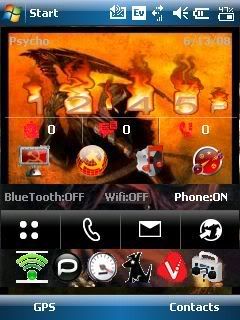 S2U2 Wallpaper Portrait  S2U2 Wallpaper Landscape  If this is the first time you have decided to put a custom rom on your phone, D/\sh has a great post that breaks down how to do it, available here: Codehttps://www.wckediden.com/showthread.php?t=153750&highlight=FLASHING+ROMS If you have a titan (HTC MOGUL) and this is the first time of which you would like to put a custom rom on your phone, you first need to update your radio, by installing the latest rom from Htc's Website. The link is : ftp://Mogulrom:sprinttitan@files164....CS_AM_Ship.exe After installing this, you need to unlock your phone using Olipro 2.40: available on this website. No matter which rom you have decided to update to: After flashing the rom, remove the battery, then reinsert it, then do a hard reset (push both of the soft keys in and hit the soft reset button) After flashing the rom, remove the battery, then reinsert it, then do a hard reset (push both of the soft keys in and hit the soft reset button) After flashing the rom, remove the battery, then reinsert it, then do a hard reset (push both of the soft keys in and hit the soft reset button) After flashing the rom, remove the battery, then reinsert it, then do a hard reset (push both of the soft keys in and hit the soft reset button) After flashing the rom, remove the battery, then reinsert it, then do a hard reset (push both of the soft keys in and hit the soft reset button) After flashing the rom, remove the battery, then reinsert it, then do a hard reset (push both of the soft keys in and hit the soft reset button) After flashing the rom, remove the battery, then reinsert it, then do a hard reset (push both of the soft keys in and hit the soft reset button) After flashing the rom, remove the battery, then reinsert it, then do a hard reset (push both of the soft keys in and hit the soft reset button) -Boot Screens- 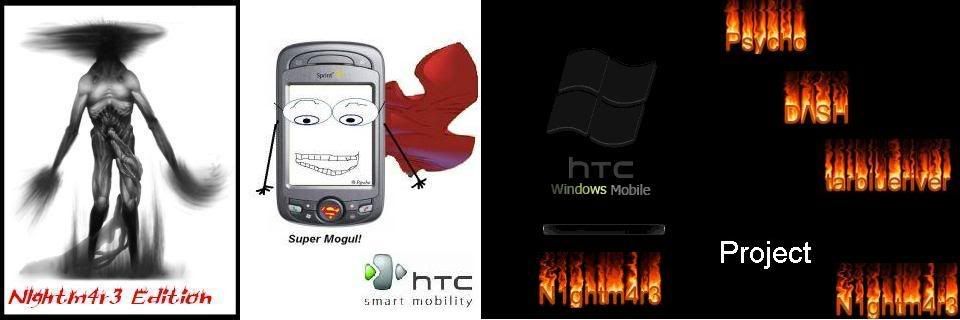 Titan - No2chem 5060 Windows Mobile 6.1 -Titan Ultimate- Cambridge Bluetooth Add-on Startup Animation Swcked Black 47 Calculator Skin Comm Manager (10-button) (TITAN & Vogue) HTC Zip Pocket RAR Additional Ringtones Additional Themes Additional Sounds AdobeReaderLE.2_00_288531 Office Excel Office Powerpoint Office Word OneNote OE Games psShutXP HTC OEM Camera 4 HTC Camera Album llium Software Screen Capture Opera Browser BL OSXRed Keyboard Skin Flash Video Bundle SprintTV (Titan) N1ghtm4r3 Configurations (HHC Clock/Tabs/Weather/Background/S2U2/Theme) Telenav Google Maps PocketCM Contacts HTC Performance Oxios Memory HTC Smartdialing B2A2DP tweaks Quick Menu HTC Home S2U2 Tweaks - Advanced Configuration - nueExtRom Configuration Tool - Titan Clean - Startup Animation 1-Calc Lite Comm Manager (10-button) (TITAN & Vogue) Office Word HTC OEM Camera 4 HTC Camera Album N1ghtm4r3 Configurations (HHC Clock/Tabs/Weather/Background/S2U2/Theme) Oxios Memory HTC Vogue Dialer HTC Home S2U2 nueExtRom Configuration Tool No matter which rom you have decided to update to: After flashing the rom, remove the battery, then reinsert it, then do a hard reset (push both of the soft keys in and hit the soft reset button) After flashing the rom, remove the battery, then reinsert it, then do a hard reset (push both of the soft keys in and hit the soft reset button) After flashing the rom, remove the battery, then reinsert it, then do a hard reset (push both of the soft keys in and hit the soft reset button) After flashing the rom, remove the battery, then reinsert it, then do a hard reset (push both of the soft keys in and hit the soft reset button) After flashing the rom, remove the battery, then reinsert it, then do a hard reset (push both of the soft keys in and hit the soft reset button) After flashing the rom, remove the battery, then reinsert it, then do a hard reset (push both of the soft keys in and hit the soft reset button) After flashing the rom, remove the battery, then reinsert it, then do a hard reset (push both of the soft keys in and hit the soft reset button) After flashing the rom, remove the battery, then reinsert it, then do a hard reset (push both of the soft keys in and hit the soft reset button) -Boot Screens-  Before you install the vogue roms, you must unlock your phone using cokeman's unlocker, available here: Vogue roms based off of No2chem's Vogue WM6.1 build 19209 - Vogue Ultimate - Cambridge Bluetooth Add-on Startup Animation Swcked Black 47 Calculator Skin Comm Manager (10-button) (TITAN & Vogue) HTC Zip Pocket RAR Additional Ringtones Additional Themes Additional Sounds AdobeReaderLE.2_00_288531 Office Excel Office Powerpoint Office Word OneNote OE Games psShutXP HTC Camera Album HTC Vogue Camera Opera Browser BL OSXRed Keyboard Skin Flash Video Bundle SprintTV (Vogue) N1ghtm4r3 Configurations (HHC Clock/Tabs/Weather/Background/S2U2/Theme) Telenav Google Maps PocketCM Contacts HTC Performance Oxios Memory HTC Smartdialing B2A2DP tweaks Quick Menu HTC Home S2U2 HTC TouchFlo w/Biotouch (Cube) Sprint Cube Skin Tweaks - Advanced Configuration - nueExtRom Configuration Tool - Vogue Clean - Startup Animation 1-Calc Lite Comm Manager (10-button) (TITAN & Vogue) Office Word HTC Camera Album HTV Vogue Camera Sptint Tv vogue N1ghtm4r3 Configurations (HHC Clock/Tabs/Weather/Background/S2U2/Theme) Oxios Memory HTC Vogue Dialer HTC Home S2U2 HTC TouchFlo w/Biotouch (Cube) Sprint Cube Skin nueExtRom Configuration Tool No matter which rom you have decided to update to: After flashing the rom, remove the battery, then reinsert it, then do a hard reset (push both of the soft keys in and hit the soft reset button) After flashing the rom, remove the battery, then reinsert it, then do a hard reset (push both of the soft keys in and hit the soft reset button) After flashing the rom, remove the battery, then reinsert it, then do a hard reset (push both of the soft keys in and hit the soft reset button) After flashing the rom, remove the battery, then reinsert it, then do a hard reset (push both of the soft keys in and hit the soft reset button) After flashing the rom, remove the battery, then reinsert it, then do a hard reset (push both of the soft keys in and hit the soft reset button) After flashing the rom, remove the battery, then reinsert it, then do a hard reset (push both of the soft keys in and hit the soft reset button) After flashing the rom, remove the battery, then reinsert it, then do a hard reset (push both of the soft keys in and hit the soft reset button) After flashing the rom, remove the battery, then reinsert it, then do a hard reset (push both of the soft keys in and hit the soft reset button) --Dialer-- tarblueriver made a special dial pad for this occation! Thanks man! 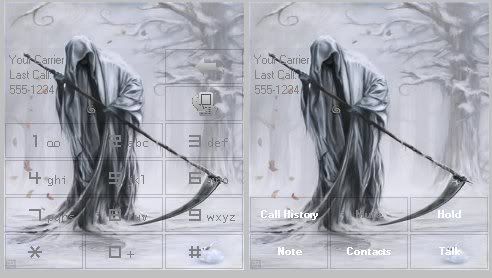 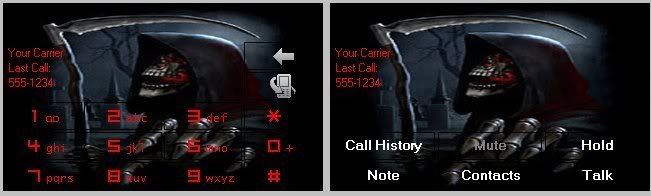 Mogul Dialer Vogue Dialer Remember to press thank you! This took a lot of time to make! build 1048 (if you add them up (1+4+8) you get 23 and 2/3 is .666 fun fact!) From the link above for the linklist, you will also find my favorite programs! Codehttp://rapidshare.com/users/SUKLKR Password Wckedidenftw Show Your Support
|
|||||||||||||||||||||||||

 About Supporter


 No support by the author.
| The Following 2 Users Say Thank You to Psycho For This Useful Post: | ||
|
antbze (11-04-2008), THE I NCREDIBLE (11-25-2008)
| ||
| Comments |
|
#102
 06-28-2008, 04:38 PM
|
||||
|
||||
 Re: N1ghtm4r3 Rom!
“ Originally Posted by D/\SH
|



|
#103
06-28-2008, 04:58 PM
|
||||
|
||||
Re: N1ghtm4r3 Rom!
“ Originally Posted by southpaw757
|


|
#104
06-28-2008, 08:03 PM
|
||||
|
||||
Re: N1ghtm4r3 Rom!
“ Originally Posted by D/\SH
|
|
#105
06-29-2008, 01:58 AM
|
||||
|
||||
|
Re: N1ghtm4r3 Rom!
I edited the first post with a rapidshare link to radio 35, will also put it here
it was also updated to my link list! Last edited by Psycho; 06-29-2008 at 02:01 AM. 
|

|
#106
06-29-2008, 02:00 AM
|
||||
|
||||
Re: N1ghtm4r3 Rom!
“ Originally Posted by southpaw757
|
|
#107
06-29-2008, 02:02 AM
|
||||
|
||||
Re: N1ghtm4r3 Rom!
“ Originally Posted by Psycho
|
|
#108
08-23-2008, 11:44 AM
|
||||
|
||||
|
Re: N1ghtm4r3 Rom!
How do i change the icons for HHC? I dont like the soviet icons....
|
|
#109
08-23-2008, 01:00 PM
|
||||
|
||||
Re: N1ghtm4r3 Rom!
“ Originally Posted by mrandygets
|
|
#110
08-23-2008, 02:27 PM
|
||||
|
||||
Re: N1ghtm4r3 Rom!
“ Originally Posted by southpaw757
|
|
#114
09-13-2008, 02:52 AM
|
||||
|
||||
Re: N1ghtm4r3 Rom!
“ Originally Posted by shacklock
|




 |
|
#116
11-20-2008, 12:53 AM
|
||||
|
||||
|
Re: N1ghtm4r3 Rom
glad you liked it, it was made by tarblueriver.
|
  |
| Tags |
| n1ghtm4r3, rom |

«
Previous Thread
|
Next Thread
»
| Currently Active Users Viewing This Thread: 1 (0 members and 1 guests) | |
|
|

|
Similar Threads
|
||||
| Thread | Thread Starter | Forum | Replies | Last Post |
| N1ghtm4r3 Rom | Psycho | PPC 6800 Questions | 0 | 06-14-2008 01:31 AM |
| N1ghtm4r3 Rom | Psycho | HTC Touch Questions | 0 | 06-14-2008 01:30 AM |
| DCD'S Titan (6800) rom 2.2.4 WM 6.1 Rev A Sprint Rom | DASH | WM And PPC Applications | 8 | 02-27-2008 02:11 AM |
| Windows Mobile 6 ROM extended - NBD v9.0(5.2.1620) (custom ROM) | DASH | WM And PPC Applications | 1 | 08-25-2007 03:11 PM |
All times are GMT -4. The time now is 04:41 PM.