• Home
  • Download
  • Links
  • Photoplog
  • Blowfish Secret
  • Base64
  • Wordpress Salt
  • Contact
  • ROM
  • Skins
  • VIP
  • Tutorial
Wckediden - Mobile Tricks and Tweaks Community  

Go Back   Wckediden - Mobile Tricks and Tweaks Community > Wckediden Bulletin Announcements > Discussion Area > Just About Digital Community
Reload this Page Hidden Galaxy Z Flip 8 feature turns your phone into a digital pocket mirro
Wckediden
Register Forum Rules FAQ Members List Social Groups Search Today's Posts Mark Forums Read

Notices
Under Construction

WckedIDen Forum Renovations

WckedIDen is currently undergoing forum structure renovations. During this process, you may experience intermittent errors, unavailable pages, or temporary service interruptions.

Please be patient while we work to improve the forum. We appreciate your understanding and continued support.


Community Links
Social Groups
Pictures & Albums
Members List
Meet Our Staff
Search Forums
 
Tag Search
Advanced Search
Search Downloads
Advanced Search
Search Links
Advanced Search
Find All Thanked Posts


Post New ThreadReply
 
Thread Tools
  #1  
Old Today, 07:50 AM
phillynews215's Avatar
phillynews215 phillynews215 is offline   Thread Starter  
I'm A Community Feed Poster

  puertorico
 
Join Date: October 11th, 2009
Posts: 13,906
Downloads: 0
Uploads: 0
phillynews215 Knows Their Stuffphillynews215 Knows Their Stuffphillynews215 Knows Their Stuffphillynews215 Knows Their Stuffphillynews215 Knows Their Stuffphillynews215 Knows Their Stuffphillynews215 Knows Their Stuffphillynews215 Knows Their Stuffphillynews215 Knows Their Stuffphillynews215 Knows Their Stuffphillynews215 Knows Their Stuff


View phillynews215's Profile   Edit Options Edit Profile Picture View phillynews215's Photo Album Add phillynews215's to Your Contacts Show Groups Edit Avatar Subscribed Threads Private Messages
Rss Feed Hidden Galaxy Z Flip 8 feature turns your phone into a digital pocket mirro

Although all three Galaxy Z8 foldables share several fundamental characteristics, each model also stands out with one or two unique features that give it a more powerful identity.


For the Galaxy Z Flip 8, one of those features is Mirror view. It's available only for the Galaxy Z Flip 8, and the only reason you may have missed it is that it requires a separate Samsung app called Camera Assistant.


Here's all you need to know.


What is Mirror view on the Galaxy Z Flip 8?


Mirror view turns the Flip 8's cover screen into a digital pocket mirror. There's not much else to it except for a couple of settings that you can't find in the usual Camera viewfinder and one that you can:


  • The circle button lets you freeze the frame.
  • The brightness button enables a ring light around the cover screen for better visibility.
  • You can double tap or pinch the screen to zoom in, same as the standard viewfinder in the camera app.

Mirror view on the Flip 8 | Source: Abhijeet Mishra / SamMobile
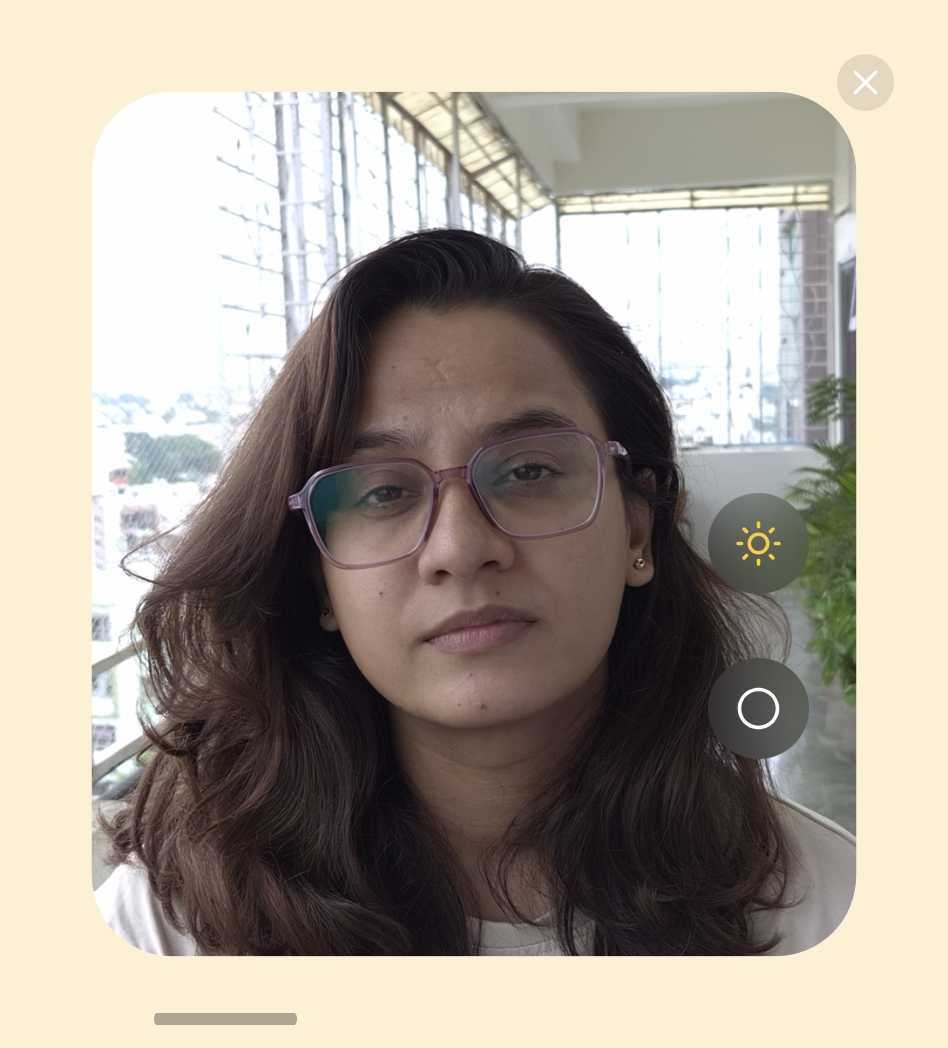

Mirror view with ring light enabled | Source: Abhijeet Mishra / SamMobile


How do you enable Mirror view on the Flip?


You'll need Samsung's Camera companion app, Camera Assistant. If it's not present on your Flip 8, you can download it:
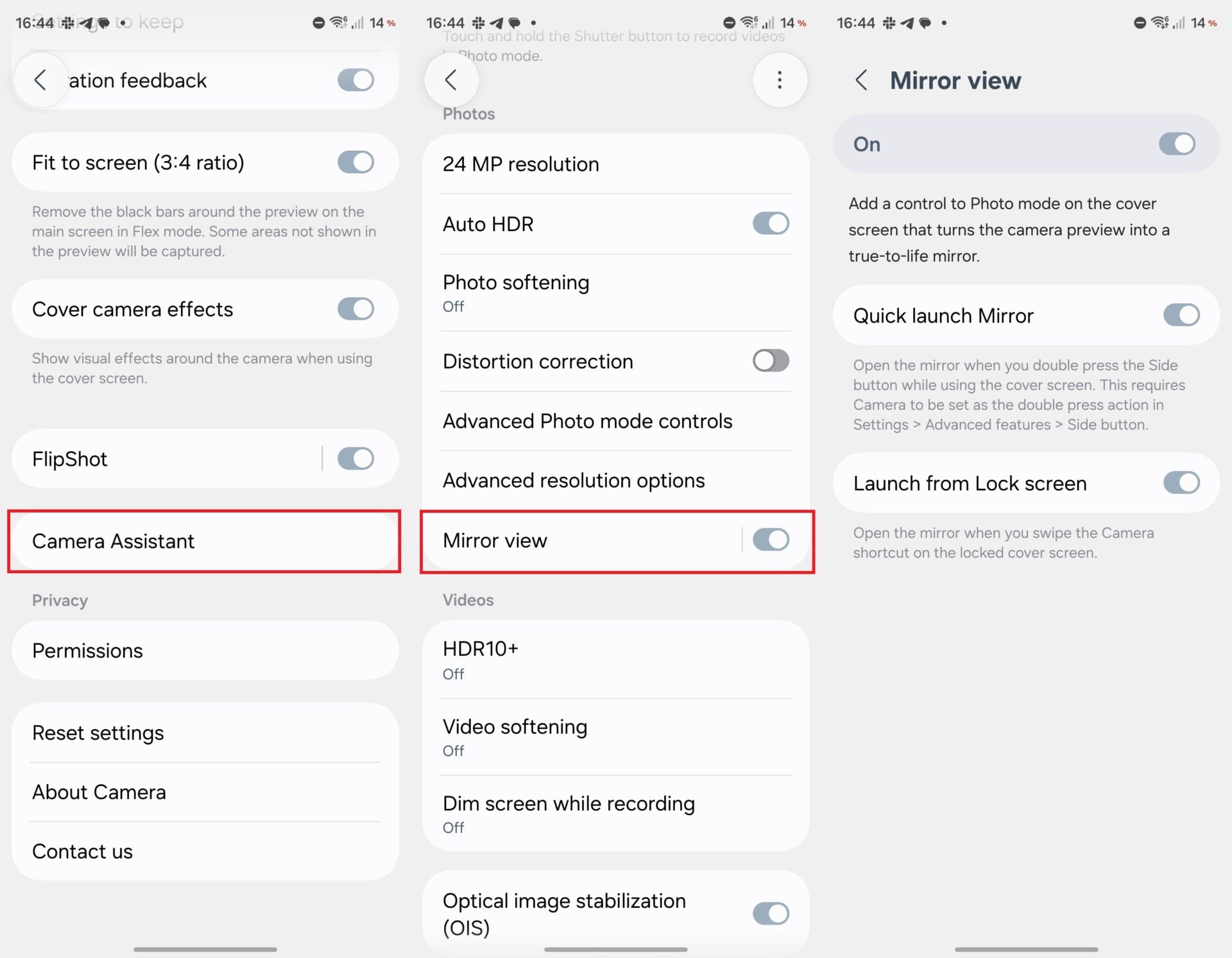

  • Unfold your Flip.
  • Open the Camera app.
  • Tap Quick Controls (the button with four square dots).
  • Tap Settings.
  • Scroll down and tap the download button next to Camera Assistant. Alternatively, download the app directly through the Galaxy Store.
  • Open Camera Assistant.
  • Scroll down and enable Mirror view.

Steps to enable Mirror view | Source: Abhijeet Mishra / SamMobile


NOTE: Tapping Mirror view next to the toggle itself reveals a couple of extra options for launching Mirror view. For example, you can quickly launch Mirror view by double-pressing the side button or create a lock screen shortcut.


How do you launch Mirror view to use the phone as a mirror?


In total, there are three ways you can launch Mirror view:


  • The lock screen shortcut (if set).
  • The side button (if set).
  • Via the Camera app: Viewfinder > Quick Controls > Mirror view.

One last trick: Mirror View also works perfectly fine with Flex Mode, so you can launch Mirror view, then partially unfold your Galaxy Z Flip 8, place it down, and use the feature hands-free.


Browse Galaxy Z Flip 8 offers


Samsung Shop


More...
Reply With Quote
phillynews215
View Public Profile
Visit phillynews215's homepage!
Find all posts by phillynews215
Post New ThreadReply

« Previous Thread | Next Thread »

Currently Active Users Viewing This Thread: 1 (0 members and 1 guests)
 
Thread Tools
Show Printable Version Show Printable Version
Email this Page Email this Page

Posting Rules
You may not post new threads
You may not post replies
You may not post attachments
You may not edit your posts

BB code is On
Smilies are On
[IMG] code is On
HTML code is On

Forum Rules


All times are GMT -4. The time now is 02:30 PM.

Wckediden Community - Archive - Privacy Statement - Terms of Service - Top


Powered by vBulletin® Version 3.8.14
Copyright ©2000 - 2026, vBulletin Solutions Inc. And Powered By phillyfinestserverstat a AI movement.
Template-Modifications by TMS
POWERED BY PHILLYFINESTSERVERSTAT WCKEDIDEN |- NEXTELELITE |- PPCTHEME |- IDENINSIDER